How to create or modify an alert
Activate or change your alerts in Exceefy to be notified during key events.
How to create or modify an alert ?
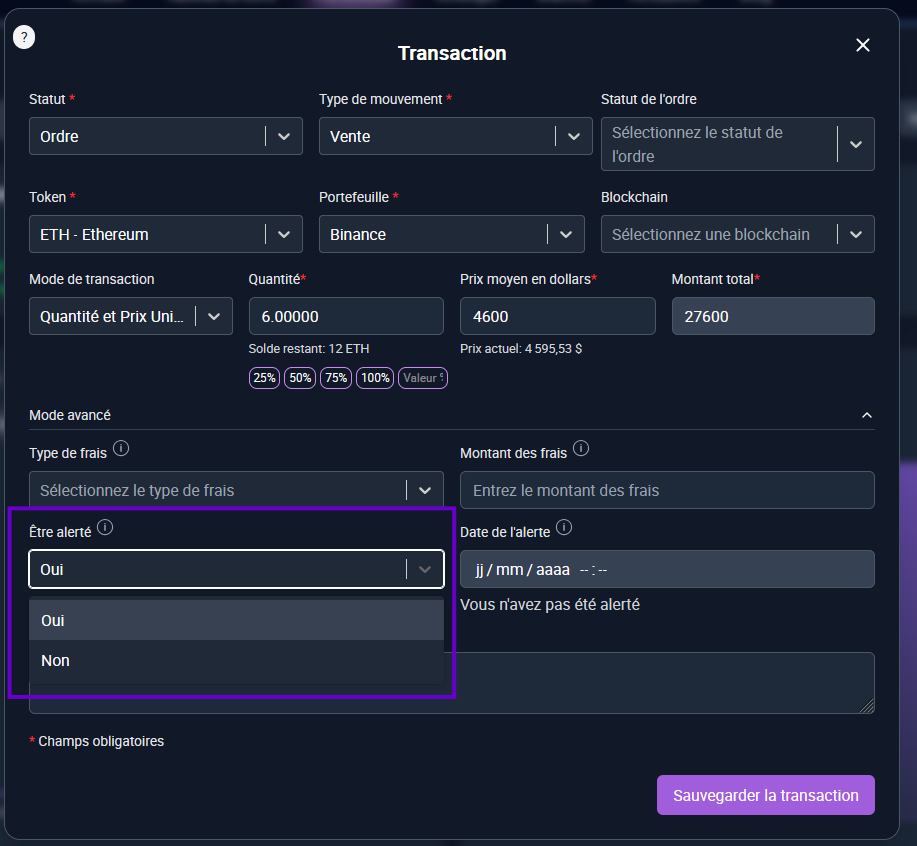
To create or modify an alert on the price of an order:
See you in the order form and click Advanced mode.
Activate the option Be alerted: Yes to receive a notification.
To modify an existing alert: return to Advanced mode of the form and change the option Be alerted: Yes/No according to your needs.

⚡ The notifications linked to Exceefy (synchronization, badges, generation of reports) are automatic and require no action.
You can also Activate or deactivate the alerts in the list directly by clicking on the corresponding icon.
A triggered alert is displayed with the Date and a green to know that it has been sent.

